Launch price $29 $49 · pay once

Product demos you
pay for once.

Record your Mac screen. RecPix adds the zoom, the captions and a talking cartoon presenter, so it looks edited. Pay once, not every month. It runs on your Mac with no account and no uploads.

Screen Studio, 3 years $324
vs
RecPix, forever $29
You keep $295
Get lifetime access — $29 → One payment. Licence for 2 Macs. Try the free version first. See how it works ↓
Made with RecPixWatch with sound

Every frame on this page was rendered by RecPix.

$0
per month, forever
One payment. No subscription, no credits.
100
cartoon presenters
The mouth follows your voice. No face needed.
4K·60
MP4, or GIF
16:9, 9:16, 1:1 and 4:3 from one recording.
The problem

You're renting your screen recorder.

The best demo recorders moved to subscriptions. You pay every month whether you shipped one video or none. Want a presenter instead of your face? That's another tool, billed by the second.

A raw recording loses people: the click that matters is a speck in a 4K frame.
Most viewers watch on mute and miss everything you say.
You don't want your face on camera, so the video feels flat.
The bill arrives every month, whether you recorded anything or not.

Recording a demo takes two minutes. You've been paying rent on it.

The fix

Own your demo recorder.
Record. Polish. Pay once.

RecPix records your screen, voice and webcam, then does the editing for you on your Mac. You buy it once and it's yours.

You

Record and talk

Full screen, a window or an area.

→
RecPix

Edits it for you

Zoom, cursor, captions, presenter, background.

→
Your audience

Sees a real demo

Ready for X, YouTube, Shorts and your site.

Features

Zoom it. Caption it. Present it.

01 · Zoom

It zooms where you click.

Every click becomes a smooth zoom on a fixed point, with clean eased moves in and out. No wobble.

  • Zooms suggested from your clicks
  • Add, move, resize or delete any zoom
  • Drag a frame to choose what each zoom shows
  • Big, smooth cursor that's easy to follow
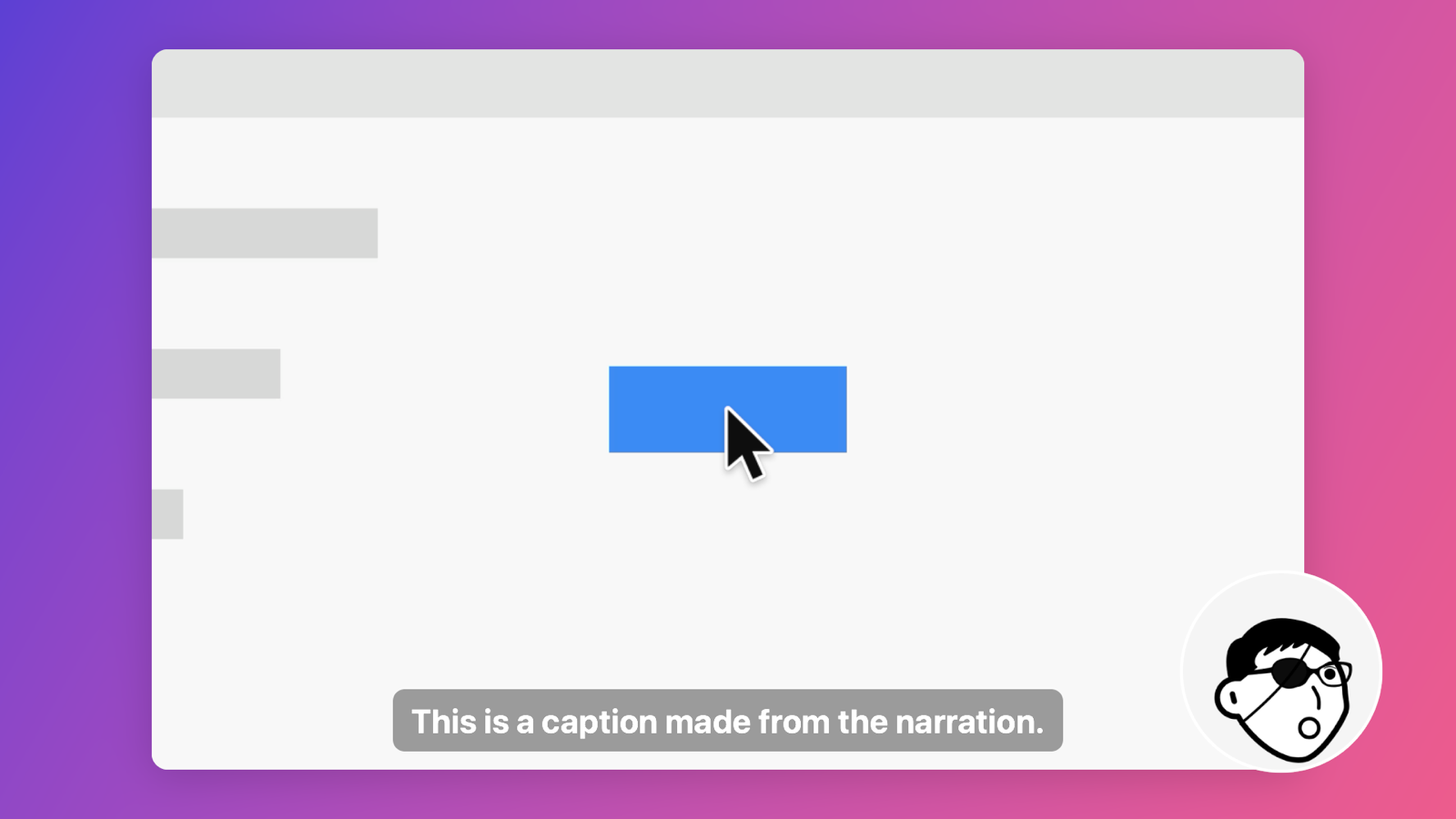
A recording zoomed in on a button with a caption and presenter
02 · Presenter

A face for your voice. Not yours.

Pick one of 100 hand-drawn presenters. Its mouth moves as you talk. Or keep your webcam, styled your way.

  • 100 cartoon presenters included
  • Webcam with size, roundness, outline and filters
  • Drag it anywhere in the frame
A vertical video with a cartoon presenter and captions
03 · Captions

Captions from your voice, made on your Mac.

Narrate as you record. Captions are written on your Mac, so nothing is uploaded or billed per minute.

  • Edit any line
  • Choose size, colour, box and position
  • Drag captions anywhere
A square video with captions
04 · Export

One recording, every format.

Re-framed for wherever it's going, with the recording centred and sharp.

  • 16:9, 9:16, 1:1 and 4:3
  • MP4 up to 4K at 60 fps, or a looping GIF
  • Gradient, colour, your own image or GIF, or a blurred match of the video
16:9
9:16
1:1
How it works

From download to first demo in about five minutes.

1

Pick what to record

Full screen, one window, or any area you drag out. Webcam, microphone and computer sound are each one switch.

2

Talk through it

Click around as usual. A small pill shows the timer and your voice level. Hover it to stop.

3

Tweak and export

Zooms, captions and your presenter are already there. Trim with full undo, then export.

Privacy

Your recordings stay yours.

Everything runs on your Mac. Recording, captions and export never leave it. No account. The only thing RecPix sends is your licence key, once, to check it. Works offline after that.

Lifetime deal

$29 once. Yours for good.

Launch price. It goes up as RecPix grows.

NOW
$29
NEXT
$39
LATER
$49
$29 one payment
  • Every feature, no watermark
  • Licence for 2 Macs
  • 100 presenters, captions, zoom, all formats
  • All version 1 updates
  • No subscription, ever
Get lifetime access — $29 →

Secure checkout by Dodo Payments. Your key arrives by email.

They charge$1,044
RecPix$29
You keep$1,015
Compare

The same polish, without the subscription.

RecPixScreen Studio (yearly)Screen Studio (monthly)Cinemak
Year 1$29$108$348Free, avatars extra
Year 2$0$108$348Avatars extra
3-year total$29$324$1,044Depends on minutes
Monthly feeNoneBilled yearly$29Credits per second
Zoom on clicksYes, editableYesYesYes
Cartoon presenter100 includedNoNoAI avatar, paid
Captions on your MacYesYesYesNot confirmed
Own it foreverYesNoNoNo

Competitor prices from their public pages and reviews, November 2026. They may change; check before you buy. RecPix isn't affiliated with Screen Studio or Cinemak.

FAQ

Straight answers.

Is it really one payment?

Yes. $29 once gets every feature and all version 1 updates. No subscription.

What does the free version do?

Everything. Exports carry a small “Made with RecPix” mark until you add a licence key.

Which Macs does it run on?

macOS 15 Sequoia or later, on Apple silicon and Intel.

How many Macs can I use?

Two. Move your licence between Macs from the Unlock screen.

Do my recordings get uploaded?

No. Recording, captions and export all happen on your Mac.

How does the presenter talk?

Its mouth switches between five shapes based on how loud and how sharp your voice is. It reads as talking, not frame-perfect lip-sync.

Can I record one window or an area?

Yes: full screen, a single window, or any area you drag out.

Make your next demo look edited.

Try it free. Pay once when you want the watermark gone.

Get lifetime access — $29 → Download free for Mac
$29 lifetimeRecPix for MacGet lifetime access →